Software development has undergone a steady transformation over the past decade, but the recent integration of artificial intelligence into coding workflows has accelerated that change dramatically. Developers are no longer limited to manual code writing, static documentation, or traditional debugging techniques. Instead, they are now working alongside systems that can interpret intent, generate code, and assist in architectural decision-making.
This shift is not simply about faster coding. It reflects a deeper change in how software is built. Instead of treating programming as a linear process—where a developer writes code, tests it, fixes errors, and repeats—the modern approach is becoming more iterative and conversational. Developers describe what they want to achieve, and AI systems respond with suggestions, plans, or even full implementations.
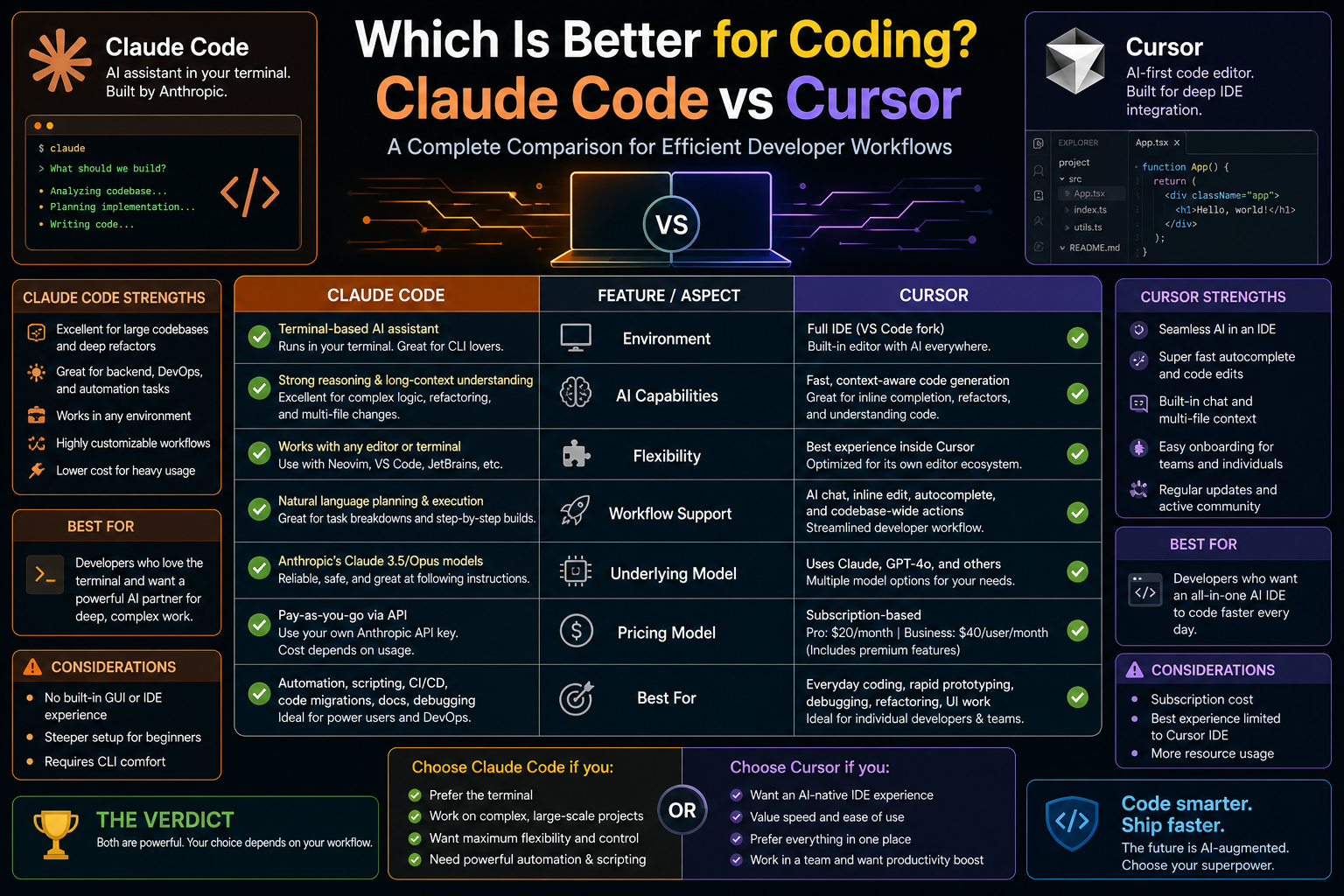
Within this evolving landscape, two tools have gained significant attention: Claude Code and Cursor. While both are designed to enhance productivity through artificial intelligence, they differ fundamentally in philosophy, design, and usage patterns. Understanding these differences is essential for developers who want to build efficient, scalable, and maintainable workflows in an increasingly AI-driven environment.
From Autocomplete to Agentic Development
Traditional development tools have long included forms of assistance such as syntax highlighting, code completion, and linting. These features improve productivity but remain limited in scope. They typically operate at the line or function level and do not understand the broader context of a project.
AI coding tools have expanded this scope significantly. Instead of offering isolated suggestions, they attempt to understand entire files, relationships between modules, and even the intent behind a developer’s request. This has given rise to what is often described as agentic coding.
Agentic coding refers to a workflow where the AI does more than assist—it actively participates in the development process. It can analyze codebases, propose multi-step solutions, generate implementation plans, and even perform structured reasoning before producing output. This represents a shift from reactive assistance to proactive collaboration.
Both Claude Code and Cursor are built around this concept, but they approach it from different directions. One prioritizes structured reasoning and planning, while the other focuses on real-time integration within the coding environment.
Claude Code as a Reasoning-Focused System
Claude Code is designed around advanced reasoning capabilities. It is built to interpret complex instructions, analyze large amounts of context, and produce structured responses that go beyond simple code generation.
At its core, Claude Code is not just a coding assistant. It functions more like a reasoning partner that helps developers think through problems before they are implemented. This distinction is important because it shapes how developers interact with it.
When a developer uses Claude Code, they often begin with a high-level description of a problem. Instead of immediately producing code, the system tends to break down the request into steps, evaluate potential approaches, and highlight considerations such as scalability, maintainability, and potential edge cases. This makes it particularly useful in situations where clarity and correctness matter more than speed.
One of its strongest capabilities is understanding large and complex codebases. Modern software systems can span hundreds or thousands of files, making it difficult for developers to maintain a mental model of the entire system. Claude Code can process large amounts of context at once, allowing it to provide explanations, identify relationships between components, and suggest improvements based on system-wide understanding.
This makes it especially valuable during tasks such as code reviews, architectural planning, and system analysis. Instead of focusing only on isolated changes, it can evaluate how modifications affect the broader structure of an application.
Cursor as an IDE-Integrated AI System
Cursor takes a different approach. Rather than existing as a separate reasoning layer, it is deeply embedded within the development environment itself. Built around familiar IDE concepts, it integrates artificial intelligence directly into the coding interface.
This integration allows developers to interact with AI without leaving their workflow. Instead of switching contexts between a chat interface and a code editor, they can request changes, generate functions, or refactor code directly within the files they are working on.
Cursor’s strength lies in this immediacy. It continuously tracks the state of the project, meaning it understands what files are open, what code is being edited, and how different components interact in real time. This enables it to provide highly contextual suggestions that evolve as the developer works.
Unlike systems that focus heavily on pre-planning, Cursor is optimized for iteration. Developers can make a change, immediately see the impact, and refine their approach continuously. This creates a fast feedback loop that is particularly useful for building features, prototyping ideas, or making incremental improvements.
Because it operates within the IDE, Cursor feels less like an external assistant and more like an extension of the development environment itself. This makes it appealing to developers who prefer hands-on coding with real-time support rather than abstract planning.
The Fundamental Philosophical Difference
Although both tools aim to enhance productivity, they are built on different philosophies of how software should be developed with AI assistance.
Claude Code is rooted in structured reasoning. It assumes that good software begins with careful analysis, planning, and understanding. It encourages developers to think through problems before writing code. The AI acts as a collaborator in the design phase, helping refine ideas and reduce ambiguity.
Cursor, on the other hand, is rooted in execution and iteration. It assumes that software evolves through continuous modification. Instead of emphasizing upfront planning, it supports rapid experimentation and immediate implementation. The AI acts as a real-time coding partner embedded within the editor.
These differences are not just technical—they reflect two distinct mental models of development. One prioritizes thoughtfulness and structure, while the other prioritizes speed and adaptability.
How Context Shapes AI Behavior in Both Tools
Context is one of the most important factors in determining how useful an AI coding tool can be. Both Claude Code and Cursor rely heavily on context, but they handle it in different ways.
Claude Code is designed to process large, static chunks of context. This means it can analyze entire files or even multiple modules at once and generate responses based on a broad understanding of the system. It is particularly effective when the context is complex and needs to be interpreted holistically.
However, because it is not tightly bound to a live editing environment, its context is often more static. Developers typically provide input, receive output, and then apply changes manually.
Cursor, in contrast, continuously updates its understanding of the project as the developer works. It tracks changes in real time, which allows it to maintain a dynamic understanding of the codebase. This enables it to provide suggestions that evolve alongside the developer’s actions.
This difference has practical implications. Claude Code is better suited for deep analysis of stable code states, while Cursor is better suited for rapidly changing environments where context is constantly shifting.
Impact on Developer Workflow Design
The introduction of AI coding tools is not just changing how code is written—it is also changing how workflows are designed.
With reasoning-focused tools like Claude Code, workflows often become more structured. Developers begin by defining goals, exploring architectural options, and refining implementation plans. Code writing becomes a later stage in the process, following a period of analysis and design.
With IDE-integrated tools like Cursor, workflows become more fluid. Developers often alternate between writing code, receiving AI suggestions, and making immediate adjustments. Planning still exists, but it is embedded within the coding process rather than separated from it.
These differences can influence team dynamics as well. Some teams may prefer a more deliberate, review-heavy approach where decisions are carefully analyzed before implementation. Others may prefer a fast-moving environment where experimentation and iteration are encouraged.
Code Understanding Versus Code Execution
Another important distinction lies in how each tool handles code understanding versus code execution support.
Claude Code excels at understanding. It can interpret complex logic, explain relationships between components, and identify potential issues at a conceptual level. It is often used to gain clarity about systems that are difficult to understand at first glance.
Cursor excels at execution support. It helps developers implement changes quickly, apply refactors across multiple files, and test ideas in real time. It is less about explaining systems and more about actively modifying them.
This distinction influences how developers choose between the two tools depending on the stage of their work. Early stages of development, where understanding and planning are critical, may benefit more from Claude Code. Later stages, where implementation and refinement are key, may benefit more from Cursor.
The Role of AI in Reducing Cognitive Load
One of the most significant benefits of both tools is their ability to reduce cognitive load. Modern software systems are complex, and developers often need to manage multiple layers of abstraction simultaneously.
Claude Code reduces cognitive load by helping developers think through problems more clearly. Instead of holding every detail in their mind, they can rely on the system to structure information, highlight dependencies, and suggest logical steps.
Cursor reduces cognitive load by handling repetitive or mechanical tasks within the editor. It can generate boilerplate code, apply consistent changes across files, and assist with debugging, allowing developers to focus on higher-level decisions.
Although they reduce cognitive load in different ways, both tools ultimately aim to make software development more manageable and less mentally exhausting.
The Evolution of Developer-AI Interaction
The relationship between developers and AI systems is evolving rapidly. Early tools focused on simple assistance, such as autocomplete or syntax suggestions. Modern tools like Claude Code and Cursor represent a more advanced stage where AI participates in reasoning and execution.
This evolution is likely to continue as models become more capable of understanding context, maintaining memory, and executing multi-step tasks. The boundary between developer and assistant will continue to blur, leading to more collaborative forms of software creation.
In this emerging environment, understanding the strengths and limitations of different tools becomes increasingly important. Developers are no longer choosing just programming languages or frameworks—they are also choosing cognitive partners that shape how they think, plan, and build software.
As AI-assisted development becomes more embedded in professional workflows, the most significant changes are happening not at the level of language or framework, but at the level of daily habits. Developers are no longer simply writing code in isolation and testing it afterward. Instead, they are continuously interacting with systems that influence how they think about problems, structure solutions, and validate their work.
In this evolving environment, tools like Claude Code and Cursor are not just optional enhancements. They actively shape the rhythm of development itself. The way a developer approaches debugging, feature building, or system design can change depending on which tool is integrated into their workflow.
Claude Code introduces a more reflective rhythm, where developers pause to evaluate ideas, explore alternative approaches, and understand implications before making changes. Cursor introduces a more continuous rhythm, where changes are made in real time, evaluated instantly, and refined through iteration.
These differences influence everything from productivity patterns to cognitive engagement, especially in complex software projects where multiple systems interact simultaneously.
Structured Thinking Versus Continuous Iteration in Practice
One of the most important distinctions between Claude Code and Cursor emerges in how they support thinking processes during development.
Claude Code encourages structured thinking by default. When presented with a problem, it tends to break it into components, identify dependencies, and suggest ordered steps for implementation. This naturally leads developers to think in stages: first understanding, then planning, and finally execution.
This structure is particularly helpful in scenarios where clarity is essential. For example, when working on a new system architecture, migrating a legacy backend, or designing APIs that will be consumed by multiple services, a structured approach reduces ambiguity. Developers can evaluate trade-offs before committing to implementation decisions.
Cursor, in contrast, encourages continuous iteration. Instead of separating thinking and execution, it blends them together. Developers can begin writing code immediately, request modifications on the fly, and adjust behavior based on immediate feedback.
This approach is especially effective in fast-moving environments. When building user interfaces, experimenting with design systems, or developing prototypes, the ability to iterate quickly often matters more than upfront planning.
The result is two fundamentally different workflows: one that emphasizes deliberate progression and another that emphasizes fluid experimentation.
Debugging Complex Systems with AI Assistance
Debugging is one of the most cognitively demanding aspects of software development, particularly in large-scale systems where issues may span multiple files, services, or dependencies.
Claude Code approaches debugging through analysis. It typically begins by interpreting error messages, reviewing related code paths, and reasoning about potential causes. Instead of jumping directly to fixes, it often explains why a problem might be occurring and outlines possible investigation paths.
This makes it particularly useful in situations where the root cause of a bug is unclear. For example, when dealing with intermittent failures, race conditions, or deeply nested logic errors, understanding the system holistically is often more valuable than applying immediate fixes.
Cursor approaches debugging through interaction. Because it operates inside the IDE, it can analyze errors in real time and suggest targeted fixes directly within the codebase. Developers can apply changes instantly and observe the results without switching contexts.
This makes it highly effective for resolving straightforward bugs, correcting syntax issues, or fixing localized logic errors. It also allows developers to experiment with multiple solutions quickly, comparing outcomes in real time.
In practice, debugging workflows often differ significantly depending on which tool is used. Claude Code tends to support investigative debugging, while Cursor supports iterative debugging.
Refactoring Strategies and Codebase Evolution
Refactoring is another area where differences between the two tools become particularly visible. Refactoring involves restructuring existing code without changing its external behavior, and it often requires careful consideration of dependencies, edge cases, and system-wide impact.
Claude Code excels in high-level refactoring strategies. It can analyze entire modules or systems and propose structured plans for improving code quality. This includes identifying redundant logic, suggesting architectural improvements, and outlining step-by-step migration paths.
Because of its reasoning-focused design, it is particularly effective in large-scale refactoring projects where changes must be carefully coordinated. For example, migrating from one framework to another or restructuring a monolithic system into modular components benefits from its ability to consider long-term implications.
Cursor, on the other hand, excels in executing refactoring tasks directly within the codebase. It can apply changes across multiple files, update references automatically, and maintain consistency throughout the project. This makes it extremely efficient for incremental refactoring work.
Developers often use Cursor to perform rapid improvements, such as simplifying functions, reorganizing components, or improving naming conventions. Because changes are applied directly in the IDE, the feedback loop is immediate.
The contrast here is clear: Claude Code focuses on planning refactoring strategies, while Cursor focuses on executing them efficiently.
System Architecture and Design Decision Support
System architecture is one of the most complex aspects of software engineering, requiring careful balancing of scalability, maintainability, performance, and cost.
Claude Code is particularly strong in this area because it emphasizes reasoning over execution. It can evaluate different architectural patterns, compare trade-offs, and explain why certain designs may be more suitable than others. This makes it valuable during early-stage planning or when redesigning existing systems.
Developers often use it to explore questions such as how to structure microservices, how to handle data flow between components, or how to design APIs that remain flexible over time. It can also help identify potential bottlenecks or design flaws before implementation begins.
Cursor plays a different role in architecture-related workflows. While it is not primarily designed for high-level planning, it becomes valuable during the implementation phase of architectural decisions. Once a design is established, Cursor helps translate it into working code efficiently.
It supports the gradual construction of systems by allowing developers to build components incrementally while maintaining awareness of project structure. This makes it particularly useful for evolving architectures where changes are frequent and iterative.
Together, the two tools reflect different stages of architectural thinking: one focuses on design clarity, the other on implementation speed.
Collaboration in Team Environments
In team-based development environments, the choice of AI tool can influence communication patterns, code review processes, and overall collaboration efficiency.
Claude Code supports asynchronous collaboration well. Because it emphasizes explanations and structured reasoning, it produces outputs that are easier to share and discuss among team members. Developers can use it to generate documentation, explain design decisions, or review complex pull requests.
This makes it especially valuable in distributed teams where communication is not always synchronous. It helps ensure that reasoning behind decisions is clearly articulated and accessible to all team members.
Cursor supports synchronous collaboration more naturally. Since it operates within the IDE, it aligns closely with real-time coding sessions. Developers working together can see changes as they happen, iterate quickly, and adjust implementations collaboratively.
This makes it well-suited for pair programming, hackathons, or fast-paced development environments where immediate feedback is essential.
In many teams, both tools can coexist, serving different collaboration modes depending on the task at hand.
Handling Large Codebases and Modular Complexity
Modern software systems often consist of multiple interconnected services, libraries, and modules. Managing this complexity requires tools that can maintain context across large codebases.
Claude Code is particularly effective at analyzing large-scale systems in a single pass. It can ingest significant amounts of code and extract meaningful structure from it. This allows it to provide summaries, identify relationships between components, and highlight architectural patterns.
This capability is especially useful when onboarding into unfamiliar systems or reviewing legacy code that lacks documentation. It reduces the cognitive burden of understanding how different parts of the system interact.
Cursor handles large codebases differently. Instead of analyzing everything at once, it focuses on the parts of the system that are actively being edited. It maintains contextual awareness of open files and nearby dependencies, allowing it to provide highly relevant suggestions in real time.
This approach works well in active development environments where developers are focused on specific features or modules rather than the entire system at once.
The difference here is between global understanding and localized awareness.
Performance Considerations in AI-Assisted Development
Performance is another important factor when comparing these tools, especially in professional environments where efficiency directly impacts productivity.
Claude Code’s performance is influenced by its emphasis on reasoning and context processing. Because it often analyzes large amounts of information before responding, its workflow can feel more deliberate. This is beneficial for tasks requiring accuracy and depth but may introduce latency in fast-paced scenarios.
Cursor prioritizes responsiveness. Its integration within the IDE allows for near-instant feedback as developers type, modify, or navigate code. This makes it feel more lightweight and interactive, especially during active coding sessions.
These performance differences influence how developers allocate tasks between tools. Time-sensitive tasks often favor Cursor, while complex analytical tasks often favor Claude Code.
Learning Curve and Developer Adaptation
Adopting AI coding tools requires developers to adjust not only their technical workflows but also their mental models of development.
Claude Code has a learning curve centered around structured interaction. Developers must learn how to frame problems in a way that encourages reasoning and planning. This often involves providing clear context and articulating goals in detail.
Cursor has a learning curve centered around integration. Developers must become comfortable working within an AI-enhanced IDE where suggestions, edits, and transformations occur continuously within the codebase.
While both tools require adaptation, they challenge different aspects of developer behavior: one emphasizes communication clarity, the other emphasizes workflow fluidity.
Security and Reliability in AI-Driven Coding Environments
Security and reliability are critical considerations when integrating AI into development workflows.
Claude Code’s structured approach often makes it easier to audit reasoning and understand why certain suggestions are made. This can improve trust in its outputs, particularly in environments where correctness is critical.
Cursor’s real-time editing capabilities require careful oversight, especially when applying large-scale changes automatically. While it can significantly accelerate development, developers must remain attentive to ensure that modifications align with intended behavior.
In both cases, human oversight remains essential. AI tools enhance productivity but do not eliminate the need for validation, testing, or review processes.
Evolution of Development Roles in AI-Augmented Systems
As tools like Claude Code and Cursor become more integrated into development workflows, the role of the developer is gradually evolving. Instead of focusing solely on writing code, developers are increasingly responsible for guiding AI systems, interpreting outputs, and making strategic decisions about implementation.
This shift places greater emphasis on architectural thinking, problem formulation, and system design. Developers who understand how to effectively collaborate with AI tools can significantly increase their productivity and influence within software projects.
The distinction between coding and designing is becoming less rigid, replaced by a more fluid interaction between human intent and machine execution.
Moving Beyond Tool Comparison Toward Workflow Design
At a certain point in the evolution of AI-assisted development, comparing tools like Claude Code and Cursor stops being about which one is “better” and becomes more about how each fits into a broader system of thinking and building software. The real shift is not in the tools themselves, but in how developers redesign their workflows around them.
Instead of replacing traditional development practices, these systems reshape them. Planning, coding, debugging, and refactoring are no longer strictly separated phases. They become overlapping activities supported by AI systems that can reason, generate, and adapt in real time.
Claude Code and Cursor represent two ends of a spectrum in this transformation. One emphasizes structured reasoning before execution, while the other emphasizes continuous execution with embedded intelligence. Understanding how to combine these approaches effectively is where modern development begins to mature.
The Emergence of Hybrid Development Workflows
In real-world engineering teams, it is increasingly rare to see developers relying on a single AI tool for every stage of development. Instead, hybrid workflows are becoming the norm, where different tools are used for different cognitive tasks.
Claude Code is often positioned at the “thinking layer” of development. It helps clarify requirements, explore system design options, and analyze complex codebases before implementation begins. It is frequently used during planning sessions, architecture discussions, and code reviews where understanding and reasoning are more important than speed.
Cursor operates at the “execution layer.” It is used during active coding sessions where developers are building features, modifying files, and iterating quickly. It provides immediate feedback, applies changes across multiple files, and accelerates the implementation of ideas that have already been defined.
When combined, these tools create a layered workflow:
First comes understanding and planning with a reasoning-focused system, followed by implementation and iteration inside an IDE-integrated environment.
This separation of cognitive roles allows developers to maintain clarity while still moving quickly.
Cognitive Load Distribution in Modern Development
One of the most significant impacts of AI-assisted coding is the redistribution of cognitive load. In traditional development, a single developer is responsible for understanding requirements, designing solutions, writing code, debugging errors, and maintaining system knowledge.
With tools like Claude Code and Cursor, these responsibilities are redistributed across different cognitive layers.
Claude Code reduces conceptual load by helping developers understand systems, break down problems, and evaluate trade-offs. It effectively externalizes high-level reasoning, allowing developers to focus on decision-making rather than memory retention.
Cursor reduces operational load by handling repetitive and mechanical aspects of coding. It assists with syntax, refactoring, file navigation, and real-time updates. This allows developers to focus more on logic and structure rather than manual implementation details.
Together, they reduce both mental overhead and context-switching friction. However, they also introduce a new form of cognitive responsibility: managing AI output quality and ensuring that generated suggestions align with system goals.
From Code Writing to Intent Specification
A major shift enabled by both Claude Code and Cursor is the movement from explicit code writing to intent specification. Instead of manually constructing every line of logic, developers increasingly describe what they want the system to achieve.
This shift is more pronounced in Claude Code, where natural language descriptions are translated into structured plans. Developers might describe a system behavior, and the tool responds with a breakdown of implementation steps, architectural considerations, and potential edge cases.
Cursor supports this shift in a more immediate way. Developers can highlight sections of code and request modifications in natural language, and the tool applies changes directly within the codebase. This creates a continuous loop between intent and implementation.
The implication of this shift is profound. Programming becomes less about syntax and more about clarity of thought. The ability to precisely articulate intent becomes as important as knowing programming constructs.
Managing Complexity in Large-Scale Systems
As software systems grow, complexity becomes one of the biggest challenges in development. Multiple services, dependencies, and abstractions can make it difficult for developers to maintain a coherent understanding of the system as a whole.
Claude Code addresses this by providing global context analysis. It can interpret large sections of code simultaneously, identify structural relationships, and explain how different parts of the system interact. This makes it particularly useful in environments where understanding system-wide behavior is critical.
For example, when dealing with distributed systems, backend architectures, or multi-service applications, Claude Code can help map out communication flows, highlight potential failure points, and summarize system behavior in a structured way.
Cursor approaches complexity differently. Instead of trying to understand the entire system at once, it focuses on local context. It tracks active files and related components, allowing developers to work deeply within a specific area of the codebase without losing awareness of surrounding dependencies.
This makes it ideal for feature development and incremental changes, where developers are working on small, well-defined parts of a larger system.
Together, these approaches reflect two complementary strategies for managing complexity: global abstraction and local focus.
Debugging as an AI-Augmented Investigation Process
Debugging has traditionally been one of the most time-consuming aspects of software development. It often involves tracing logic paths, interpreting logs, and reproducing edge cases.
With Claude Code, debugging becomes an investigative process. The tool analyzes error messages, examines relevant code paths, and constructs hypotheses about possible causes. Instead of simply suggesting fixes, it often explains why an issue might be occurring and how different components contribute to the problem.
This encourages developers to think in terms of systems rather than isolated errors. It is particularly useful for subtle bugs that arise from complex interactions between components.
Cursor transforms debugging into an interactive process. Errors are surfaced directly within the IDE, and suggested fixes can be applied immediately. Developers can test changes in real time, observe outcomes, and refine solutions iteratively.
This creates a rapid feedback loop that significantly reduces the time required to resolve straightforward issues.
In practice, many developers use both approaches: Claude Code for understanding the root cause and Cursor for implementing and validating fixes.
Refactoring as Continuous System Improvement
Refactoring is no longer a periodic activity in modern workflows. With AI assistance, it becomes a continuous process embedded within development.
Claude Code helps define refactoring strategies. It can analyze code structure, identify inefficiencies, and suggest architectural improvements. This is especially valuable when working with legacy systems or preparing large-scale migrations.
Cursor executes refactoring tasks efficiently within the codebase. It can apply changes across multiple files, update references, and ensure consistency throughout the system. This allows developers to perform large-scale modifications without manually tracking every dependency.
This combination enables a more fluid approach to system improvement, where design and implementation evolve together rather than being treated as separate phases.
Decision-Making in AI-Assisted Environments
One of the subtle but important changes introduced by AI coding tools is how decision-making is distributed. Developers are no longer solely responsible for generating solutions from scratch. Instead, they evaluate, refine, and select from AI-generated options.
Claude Code supports decision-making by providing structured comparisons between different approaches. It helps developers understand trade-offs in terms of performance, maintainability, and scalability.
Cursor supports decision-making by enabling rapid experimentation. Developers can test multiple implementations quickly and observe results directly within the codebase.
This duality creates a more dynamic decision-making process where reasoning and experimentation reinforce each other.
The Role of Experience in AI-Augmented Development
Experience remains a critical factor in determining how effectively developers use AI tools. While these systems can generate code and provide suggestions, they do not replace domain knowledge or architectural understanding.
Experienced developers tend to use Claude Code more effectively for high-level planning because they can better evaluate the quality of reasoning and identify gaps in logic. They also use Cursor more efficiently because they understand when to trust automated changes and when to intervene.
Less experienced developers may rely more heavily on generated outputs, which can increase productivity but also introduce risk if suggestions are not carefully reviewed.
This highlights an important reality: AI tools amplify developer capabilities, but they do not replace foundational engineering knowledge.
Evolving Best Practices in AI-Driven Development
As adoption increases, new best practices are emerging around how to integrate AI tools effectively into development workflows.
One common pattern is separating phases of work based on cognitive type. Developers may use reasoning-focused tools for planning and design, then switch to execution-focused tools for implementation.
Another emerging practice is iterative validation. Instead of trusting a single AI output, developers refine prompts, compare alternatives, and validate results through testing and review.
There is also growing emphasis on maintaining human oversight. Even as AI systems become more capable, developers remain responsible for ensuring correctness, security, and performance.
These practices reflect a broader shift toward collaborative intelligence rather than automation.
Long-Term Impact on Software Engineering Roles
The integration of AI into development workflows is gradually reshaping what it means to be a software engineer. While coding remains central, the emphasis is shifting toward higher-level responsibilities such as system design, problem framing, and decision-making.
Developers are increasingly acting as orchestrators of AI systems rather than solely producers of code. They define goals, interpret outputs, and guide implementation rather than manually constructing every component.
This shift does not reduce the importance of engineering expertise. Instead, it elevates the role of abstraction, reasoning, and system-level thinking.
Claude Code and Cursor both contribute to this transformation, but in different ways. One strengthens analytical and planning capabilities, while the other enhances execution speed and iteration.
The Future Direction of AI-Assisted Development
Looking forward, AI-assisted development is likely to become even more integrated into every stage of the software lifecycle. Tools will become more context-aware, more persistent in memory, and more capable of understanding long-term project evolution.
The distinction between planning and coding may continue to blur further. Systems may eventually handle entire workflows from requirement analysis to deployment with minimal human intervention, while developers focus on guiding direction and ensuring alignment with goals.
However, even in highly automated environments, human judgment will remain essential. Software development is not just a technical process but also a creative and strategic one.
Claude Code and Cursor represent early but significant steps in this direction. One emphasizes structured reasoning, the other emphasizes embedded execution. Together, they illustrate the direction in which software engineering is evolving: toward a more collaborative, AI-augmented discipline where thinking and building are increasingly intertwined.
Practical Adoption in Real Engineering Teams
In real engineering environments, the choice between Claude Code and Cursor is rarely absolute. Teams often evolve their usage patterns organically based on project needs, team size, and the maturity of their codebase. What begins as experimentation with AI tools gradually becomes embedded into standard operating procedures, especially when teams notice measurable improvements in delivery speed and code quality.
In early-stage startups, Cursor tends to dominate because speed is the primary concern. Teams working on product validation, MVPs, or rapidly changing requirements benefit from an environment where code can be generated, modified, and tested in seconds. The IDE-centric nature of Cursor fits naturally into this fast iteration cycle, where decisions are frequently revised and implementation speed matters more than long-term architectural refinement.
In contrast, more mature engineering teams—especially those managing complex systems—often lean toward Claude Code during planning and review phases. Large codebases, multiple service dependencies, and long-term maintenance concerns require a deeper level of reasoning before changes are implemented. In these environments, Claude Code is frequently used to analyze pull requests, assess architectural risks, and generate structured implementation plans before any code is written.
Another important aspect of real-world adoption is knowledge sharing. Claude Code tends to produce outputs that are easier to document and communicate across teams because of its structured reasoning style. This makes it valuable in onboarding scenarios, where new engineers need to understand not just what the system does, but why it was designed that way.
Cursor, on the other hand, accelerates tacit learning. Developers become familiar with codebases more quickly by actively interacting with them, making changes, and observing immediate outcomes. This hands-on engagement can shorten the learning curve for new team members, especially in dynamic environments where the system evolves frequently.
Over time, many teams converge on a balanced workflow where both tools are used in complementary ways. Claude Code is often used for upstream thinking—defining what should be built and why—while Cursor is used downstream for building and refining those ideas into working systems. This division creates a natural pipeline where reasoning feeds execution, and execution feeds further refinement.
As AI-assisted development continues to mature, this hybrid approach is likely to become standard practice rather than an exception.
Conclusion
The comparison between Claude Code and Cursor ultimately reflects a broader transformation in how software is designed, built, and maintained. These tools are not simply competing products with overlapping features; they represent two different philosophies of development assistance. One is rooted in structured reasoning and careful analysis, while the other is grounded in speed, iteration, and deep integration within the coding environment. Understanding this distinction is more important than deciding a universal “winner,” because modern development rarely follows a single fixed approach.
Claude Code is most powerful when clarity, planning, and correctness matter. It helps developers step back from the immediate act of coding and think more deeply about structure, dependencies, and long-term maintainability. In complex systems where decisions have wide-reaching consequences, this ability to reason through problems before implementation becomes especially valuable. It supports a mindset where code is the final expression of well-thought-out design rather than the starting point of exploration. For teams working with large architectures, legacy systems, or multi-service environments, this structured approach can significantly reduce ambiguity and improve decision quality.
Cursor, in contrast, thrives in environments where momentum and iteration drive progress. By embedding AI directly into the IDE, it removes friction between thought and execution. Developers can modify, test, and refine code continuously without breaking their workflow. This makes it particularly effective for rapid development cycles, experimental features, and situations where requirements evolve quickly. Instead of separating planning from execution, Cursor blends them into a single continuous loop, allowing ideas to be tested almost immediately as they are formed.
The real value, however, emerges when these tools are viewed not as alternatives but as complements. Software development today is rarely linear. A single project may require careful architectural planning at one stage, rapid prototyping at another, and deep debugging at another. In such environments, relying on only one type of tool can limit flexibility. Claude Code strengthens the thinking process, while Cursor strengthens the building process. Together, they create a more complete development experience that supports both depth and speed.
As AI continues to evolve, the role of the developer is also shifting. The focus is moving away from manual code production and toward higher-level responsibilities such as defining intent, evaluating system behavior, and guiding automated processes. In this context, tools like Claude Code and Cursor do not replace developers—they amplify them. They reduce repetitive effort, surface insights more quickly, and allow engineers to focus on decisions that require human judgment.
Ultimately, the choice between Claude Code and Cursor is less about preference and more about understanding workflow needs. Developers who prioritize reasoning, structure, and architectural clarity may gravitate toward Claude Code. Those who prioritize speed, iteration, and hands-on coding may find Cursor more aligned with their style. Many will benefit from using both, switching between them as different stages of development demand different strengths.
The future of software engineering will likely not be defined by a single tool, but by how effectively developers combine multiple AI systems into coherent workflows. In that future, success will depend less on typing code and more on orchestrating intelligent systems to build reliable, scalable, and maintainable software.