Modern software development has shifted dramatically from traditional manual release cycles to highly automated and continuous delivery models. At the heart of this transformation is the concept of CI/CD, which stands for continuous integration and continuous delivery or deployment. These practices allow development teams to integrate code changes frequently, test them automatically, and deliver updates to users with speed and reliability. Over time, CI/CD has become a foundational part of DevOps culture, where collaboration between development and operations teams is prioritized to improve software quality and delivery efficiency.
Within this evolving landscape, Microsoft has positioned itself as a major contributor by offering multiple tools that support automation and orchestration of development workflows. Two of the most widely used solutions in this space are GitHub Actions and Azure Pipelines. While both serve the same general purpose of enabling CI/CD pipelines, they are designed with different philosophies, integration strengths, and target audiences.
GitHub Actions emerged as a natural extension of GitHub’s role as a leading platform for version control and collaboration. It allows developers to automate workflows directly within their repositories, making it highly convenient for projects already hosted on GitHub. Its design emphasizes simplicity, accessibility, and flexibility, enabling developers to build pipelines without needing complex external infrastructure.
On the other hand, Azure Pipelines is part of a broader suite of DevOps services designed for enterprise-scale software delivery. It is deeply integrated with Microsoft Azure and supports complex deployment environments, making it suitable for large organizations with extensive infrastructure needs. Unlike GitHub Actions, Azure Pipelines is often used in environments where centralized control, governance, and integration with cloud services are critical.
Although both tools originate from the same parent company ecosystem, their use cases are not identical. Understanding their differences requires examining how each tool approaches automation, scalability, usability, and integration. This comparison becomes particularly important as organizations seek to optimize their development workflows based on cost, complexity, and operational requirements.
The growing demand for faster software delivery has made CI/CD tools essential rather than optional. As a result, choosing between GitHub Actions and Azure Pipelines is not simply a technical decision but also a strategic one that affects development speed, infrastructure management, and long-term scalability.
GitHub Actions in Modern Development Workflows
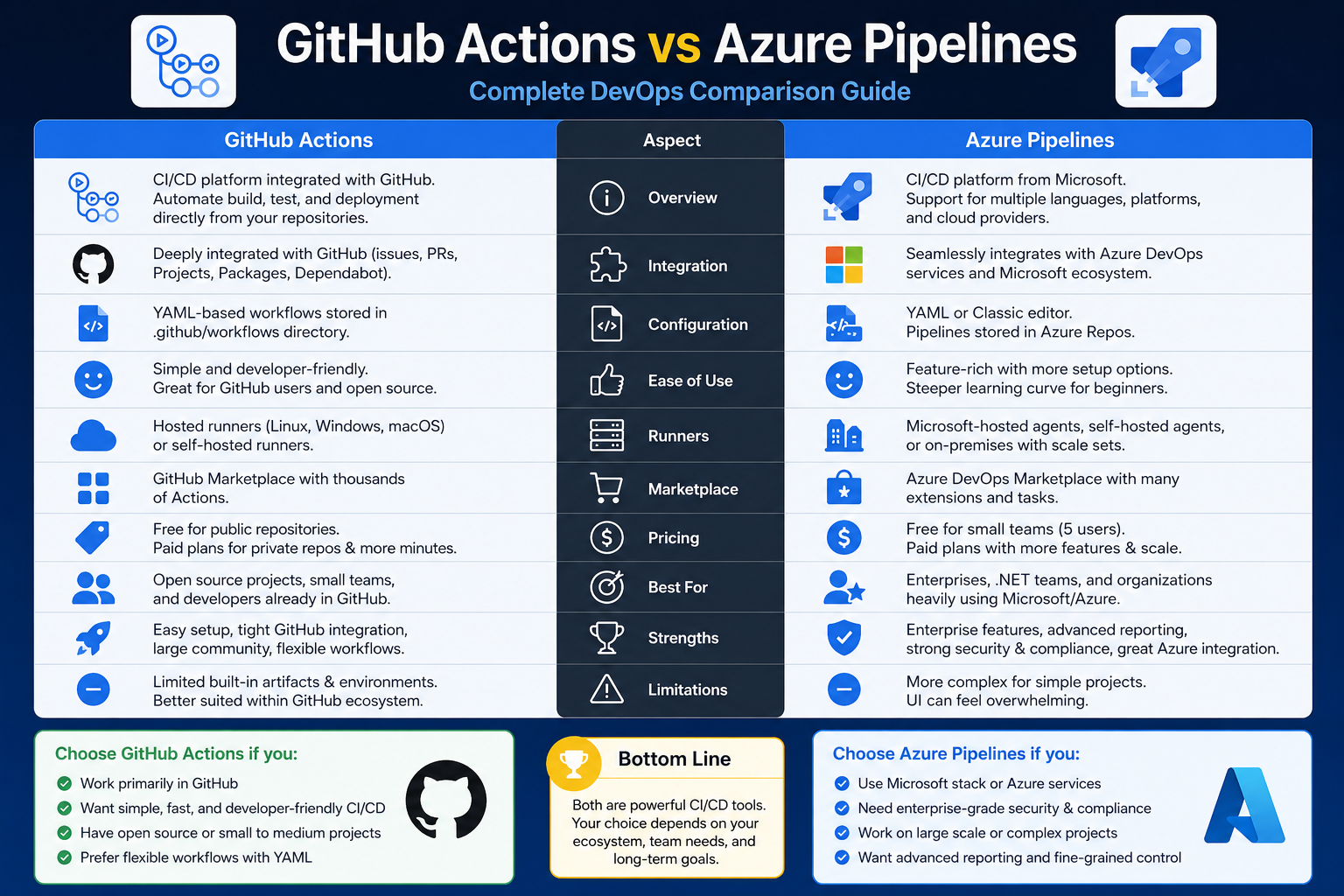
GitHub Actions is designed to bring automation directly into the development workflow without requiring external tools or complex setup processes. It operates within GitHub repositories, allowing developers to define automated processes using configuration files stored alongside their code. This close integration makes it particularly appealing for teams already using GitHub as their primary platform for version control and collaboration.
One of the defining characteristics of GitHub Actions is its event-driven architecture. Workflows can be triggered by a wide range of events such as code pushes, pull requests, issue creation, or scheduled intervals. This flexibility allows teams to automate almost every aspect of their development lifecycle, from running tests to deploying applications.
The simplicity of GitHub Actions lies in its modular structure. Workflows are built using reusable components known as actions, which can be shared across projects or downloaded from a community-driven marketplace. This encourages collaboration and reduces the need to write complex automation scripts from scratch. Developers can compose workflows by combining these actions in a structured sequence, making it easier to manage and maintain CI/CD pipelines.
Another important aspect of GitHub Actions is its accessibility. It is designed to be approachable for developers who may not have extensive experience with CI/CD systems. The learning curve is relatively gentle, especially for those already familiar with GitHub. This makes it an attractive option for startups, small teams, and open-source projects where simplicity and speed of adoption are important.
In terms of scalability, GitHub Actions can handle a wide range of workloads, from small personal projects to large enterprise applications. However, its strength lies in flexibility rather than deep infrastructure control. It works best in environments where the codebase is already hosted on GitHub and where development workflows are closely tied to repository activities.
Cost considerations also play a role in its adoption. GitHub Actions offers a free tier that supports many small-scale projects, especially open-source repositories. This makes it accessible to individual developers and small teams who want to experiment with CI/CD without significant financial investment. Paid tiers are available for larger organizations that require additional resources and capabilities.
Despite its advantages, GitHub Actions may have limitations in highly complex enterprise environments. While it integrates well within the GitHub ecosystem, it may require additional configuration to work seamlessly with external systems or multi-cloud infrastructures. Nevertheless, its flexibility and ease of use make it a strong choice for modern development workflows focused on speed and simplicity.
Azure Pipelines in Enterprise-Scale Delivery Systems
Azure Pipelines represents a more traditional and enterprise-focused approach to CI/CD automation. It is part of a broader DevOps ecosystem that integrates deeply with Microsoft Azure services. This integration allows organizations to build, test, and deploy applications across a wide range of environments, including cloud, on-premises, and hybrid infrastructures.
One of the key strengths of Azure Pipelines is its ability to support complex and large-scale software delivery processes. It is designed for organizations that require strict control over their deployment pipelines, including governance, security, and compliance features. This makes it particularly suitable for industries such as finance, healthcare, and government, where regulatory requirements are a major concern.
Azure Pipelines supports multiple programming languages, platforms, and deployment targets, making it highly versatile. It is not limited to Microsoft technologies, even though it integrates most effectively within the Azure ecosystem. This cross-platform capability allows organizations to manage diverse technology stacks under a single CI/CD system.
Another important feature of Azure Pipelines is its advanced configuration capabilities. It allows teams to define highly customized pipelines that include multiple stages, approval gates, and deployment strategies. This level of control is essential for large organizations where software must pass through multiple validation layers before reaching production environments.
Integration is one of the strongest aspects of Azure Pipelines. It connects seamlessly with other Azure services, such as monitoring, security, and application management tools. This creates a unified environment where development, deployment, and operations are tightly connected. As a result, organizations can achieve better visibility and control over their entire software lifecycle.
However, this level of sophistication comes with increased complexity. Azure Pipelines typically requires more setup and configuration compared to simpler CI/CD tools. Teams may need specialized knowledge to design and manage pipelines effectively, especially in large-scale environments with multiple dependencies.
Cost is another important factor. While Azure Pipelines can be highly efficient within an existing Azure infrastructure, building and maintaining a full CI/CD environment can become expensive depending on resource usage and scale. Organizations often need to evaluate infrastructure requirements carefully to avoid unexpected costs.
Despite these challenges, Azure Pipelines remains a powerful solution for enterprises that require reliability, scalability, and deep integration with cloud infrastructure. It is particularly valuable for teams that prioritize structured workflows and centralized management of software delivery processes.
Choosing Between GitHub Actions and Azure Pipelines
Selecting between GitHub Actions and Azure Pipelines depends largely on organizational needs, existing infrastructure, and development priorities. Both tools are capable of supporting CI/CD workflows, but they serve different types of users and environments.
GitHub Actions is often the preferred choice for teams that prioritize simplicity, rapid setup, and tight integration with GitHub repositories. It is particularly effective for projects that do not require complex infrastructure or multi-stage deployment pipelines. Its flexibility and ease of use make it suitable for developers who want to focus on writing and deploying code without managing extensive DevOps configurations.
Azure Pipelines, in contrast, is better suited for organizations with complex deployment requirements and existing investments in Microsoft Azure. It offers deeper control over build and release processes, making it ideal for enterprise environments where governance, compliance, and scalability are critical. Its integration with Azure services also makes it a natural fit for cloud-centric architectures.
Another important consideration is team size and structure. Smaller teams or individual developers may find GitHub Actions more accessible and cost-effective, while larger organizations with dedicated DevOps teams may benefit from the advanced capabilities of Azure Pipelines. The level of expertise available within the team can also influence the choice, as Azure Pipelines generally requires more specialized knowledge.
Ultimately, the decision is not about which tool is universally better, but which tool aligns more closely with the specific needs of a project or organization. Both platforms continue to evolve, and in many cases, they can even coexist within different parts of the same organization depending on workflow requirements.
Conclusion
GitHub Actions and Azure Pipelines are both powerful CI/CD solutions that reflect different approaches to modern software delivery. GitHub Actions focuses on simplicity, accessibility, and tight integration with code repositories, making it ideal for developers who value speed and ease of use. Azure Pipelines, on the other hand, emphasizes enterprise-grade control, scalability, and deep integration with cloud infrastructure, making it suitable for complex organizational environments. The choice between them depends on factors such as project size, infrastructure needs, and team expertise. Rather than competing directly, they complement different segments of the development ecosystem, offering flexible options for teams at various stages of maturity.