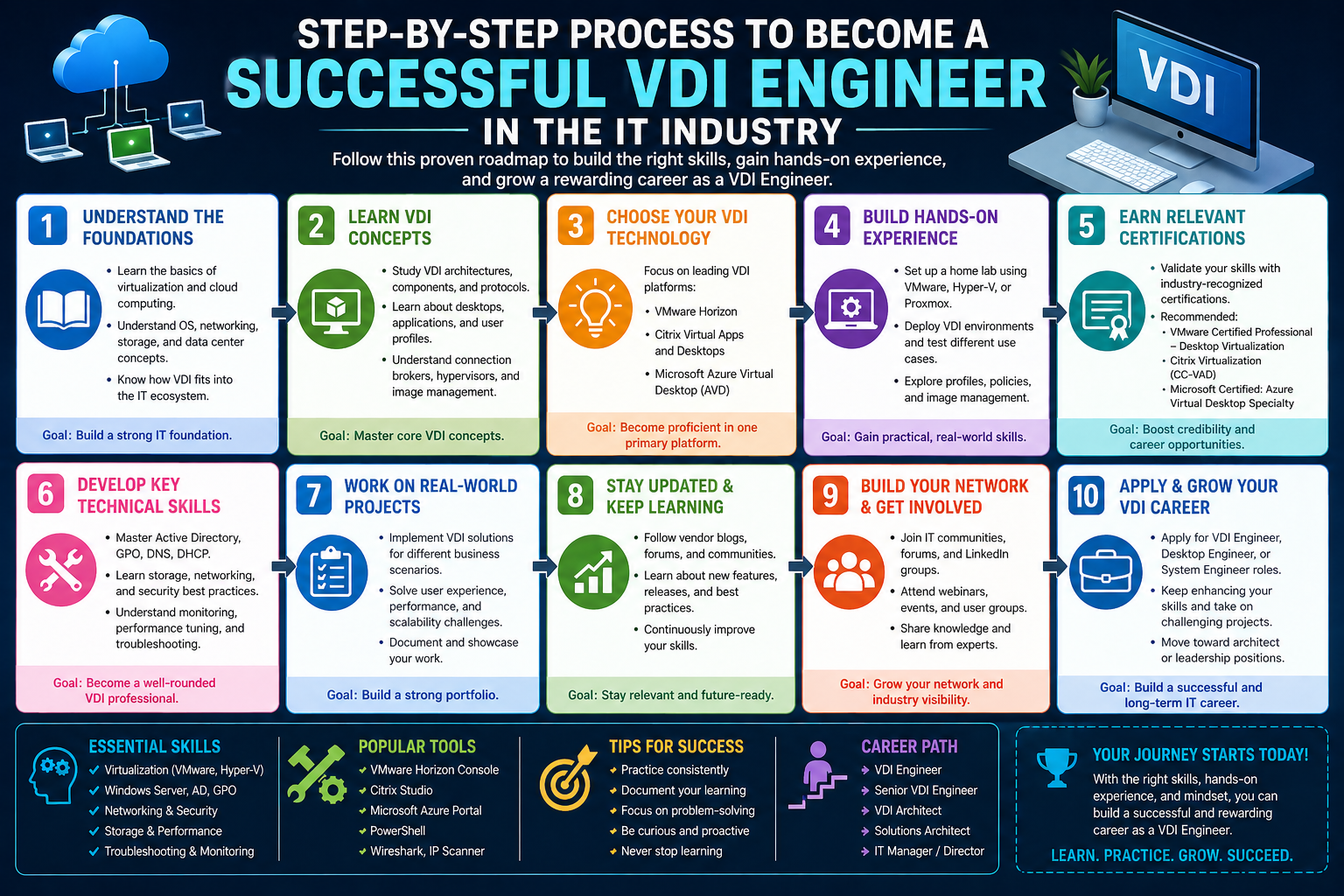
Virtual Desktop Infrastructure is a model of computing where desktop environments are hosted on centralized servers rather than being installed and run on individual physical machines. Instead of relying on a local computer to process everything, the desktop operating system, applications, and user settings are delivered from a controlled data center environment. Users access their desktops remotely through endpoints that may include laptops, thin clients, or other connected devices.
This approach fundamentally changes how computing resources are managed in organizations. Traditional desktop environments require manual installation, updates, and troubleshooting on every individual machine. In contrast, virtual desktop environments centralize these responsibilities, allowing engineers and administrators to manage thousands of desktops from a single infrastructure layer.
At its core, this model is built around the idea of abstraction. The physical hardware is separated from the user experience. A user interacts with what appears to be a normal desktop, but the actual processing, storage, and execution happen on remote servers. This separation creates flexibility in deployment and management while allowing organizations to maintain consistency across user environments.
Virtual Desktop Infrastructure is often adopted in environments where security, control, and scalability are critical. Since data remains within centralized servers rather than individual devices, organizations can reduce risks associated with data loss, device theft, or inconsistent configurations. It also enables employees to access their work environments from different locations without needing to carry dedicated hardware.
The structure of this system relies heavily on virtualization technology, which allows multiple virtual machines to run on a single physical server. Each virtual machine behaves like an independent computer with its own operating system and applications. This enables efficient use of hardware resources while supporting a large number of users simultaneously.
Another key aspect of this model is standardization. Instead of maintaining many different desktop setups across an organization, engineers create standardized environments that can be deployed repeatedly. This ensures consistency in performance, security settings, and application availability. It also reduces the complexity of troubleshooting since environments are built from controlled templates.
Virtual Desktop Infrastructure also plays an important role in supporting remote and hybrid work models. Since desktops are no longer tied to physical devices, employees can access their environments securely from different locations. This flexibility has become increasingly important in modern IT ecosystems where mobility and accessibility are essential requirements.
Despite its advantages, this model introduces new challenges in design and maintenance. Performance depends heavily on network stability, server capacity, and storage systems. Engineers must carefully design infrastructure to ensure that the user experience remains smooth even under high-demand conditions. Small misconfigurations or resource bottlenecks can affect large numbers of users at once.
Overall, Virtual Desktop Infrastructure represents a shift from device-centric computing to centralized service delivery. It requires a combination of system design knowledge, infrastructure awareness, and user experience understanding. This combination of requirements is what makes the role of a VDI engineer both complex and highly specialized within the IT field.
Core Responsibilities of a VDI Engineer
A VDI engineer is responsible for designing, implementing, and maintaining virtual desktop environments that support end users across an organization. Their work involves both infrastructure-level tasks and detailed configuration work related to desktop environments. This combination of responsibilities requires technical depth as well as a strong understanding of how users interact with systems.
One of the primary responsibilities involves building and maintaining the virtual desktop environment itself. This includes creating the foundational setup that defines how desktops are delivered, how users access them, and how resources are allocated. Engineers must ensure that the environment is stable, scalable, and capable of supporting current and future demand.
Another major responsibility is managing system performance. Since virtual desktops run on shared infrastructure, performance optimization becomes essential. Engineers must monitor resource usage, identify bottlenecks, and adjust configurations to maintain a consistent user experience. This often involves balancing CPU, memory, storage, and network resources across multiple virtual machines.
VDI engineers also handle the configuration of user access and entitlement systems. This means defining which users can access specific virtual desktops, what applications are available to them, and what level of permissions they have. Proper configuration ensures that users receive the correct environment based on their role within the organization.
Troubleshooting is another significant aspect of the role. When users experience performance issues or connectivity problems, VDI engineers are responsible for identifying the root cause. These issues can originate from various layers, including the network, storage system, virtualization layer, or desktop configuration itself. Diagnosing problems requires systematic analysis and strong familiarity with all components of the environment.
Maintenance activities are also part of daily responsibilities. Virtual desktop environments require regular updates to operating systems, applications, and infrastructure components. Engineers must apply these updates carefully to avoid disrupting user activity. This often involves testing changes in controlled environments before deploying them to production systems.
Another important responsibility involves capacity planning. As organizations grow, the demand for virtual desktops increases. Engineers must predict future usage patterns and ensure that infrastructure can scale accordingly. This includes evaluating hardware requirements, storage needs, and network capacity to support additional users.
Security management is also central to the role. Since virtual desktops often handle sensitive organizational data, engineers must implement security controls that protect both the infrastructure and the user environments. This includes access controls, encryption mechanisms, and system hardening techniques.
VDI engineers also collaborate with other IT teams. Since virtual desktop environments depend on underlying infrastructure such as networks and storage systems, coordination with network engineers, system administrators, and security teams is essential. This collaboration ensures that all layers of the system work together efficiently.
In addition to technical responsibilities, documentation plays an important role. Engineers are expected to maintain detailed records of system configurations, changes, and operational procedures. This documentation helps ensure continuity, especially in large environments where multiple engineers may work on the same systems.
Overall, the role of a VDI engineer extends beyond simple system administration. It involves managing complex environments that require careful balancing of performance, security, scalability, and user experience. The responsibilities are interconnected, and decisions in one area often impact other parts of the system.
Building Blocks of VDI Architecture
The architecture of Virtual Desktop Infrastructure is composed of several key components that work together to deliver virtual desktops to end users. Each component plays a specific role in ensuring that the system operates efficiently, securely, and reliably.
At the foundation of this architecture is the virtualization layer. This layer allows physical hardware to be divided into multiple virtual machines. Each virtual machine acts as an independent computing environment with its own operating system and allocated resources. This abstraction is essential for enabling multiple users to share the same physical infrastructure.
Another critical component is the connection broker. This system is responsible for managing user access to virtual desktops. When a user attempts to connect, the broker determines which desktop should be assigned based on availability, user identity, and predefined rules. It acts as an intermediary between the user and the virtual machine.
Storage systems form another essential part of the architecture. Virtual desktops rely heavily on centralized storage to store operating system images, user profiles, and application data. The performance of these storage systems directly affects the responsiveness of virtual desktops. Efficient storage design is therefore a key requirement in any VDI environment.
The network layer also plays a crucial role. Since users access their desktops remotely, network performance determines how smooth the experience will be. High latency or unstable connections can lead to delays and disruptions in user sessions. Engineers must ensure that network infrastructure is optimized for low latency and high reliability.
Another important component is the management console. This interface allows engineers to configure, monitor, and maintain the entire VDI environment. Through this system, they can deploy virtual desktops, assign users, monitor performance, and apply updates. It serves as the central control point for all administrative activities.
Authentication systems are also integrated into the VDI architecture. These systems verify user identities before granting access to virtual desktops. This ensures that only authorized users can access specific environments. Authentication is typically integrated with centralized identity management systems within organizations.
Monitoring and logging systems are equally important. These tools track system performance, user activity, and potential errors within the environment. By analyzing this data, engineers can identify trends, detect issues early, and optimize system performance over time.
Another key element is the desktop image management system. This system defines the base configuration of virtual desktops, including the operating system, applications, and system settings. Engineers use these images as templates for deploying new virtual machines. Maintaining these images is a critical part of ensuring consistency across the environment.
Load-balancing mechanisms are also part of the architecture. These systems distribute user sessions across multiple servers to prevent overload on any single machine. This ensures stable performance even during peak usage periods.
Together, these components form a tightly integrated system that delivers virtual desktops to users in a controlled and efficient manner. Each layer depends on the others, and changes in one area can have significant effects across the entire environment. Understanding how these building blocks interact is essential for anyone working in VDI engineering.
Role of Operating Systems and Base Images in Virtual Desktops
Operating systems and base images are central to the functioning of Virtual Desktop Infrastructure environments. A base image is essentially a standardized version of an operating system that includes preconfigured settings, applications, and system optimizations. It serves as the foundation for all virtual desktops deployed within the environment.
The concept of a base image allows engineers to maintain consistency across multiple virtual machines. Instead of installing software individually on each desktop, a single image is created and used as a template. This ensures that all virtual desktops share the same configuration, reducing variability and simplifying management.
Operating systems within VDI environments are often optimized specifically for virtualization. These optimizations may include disabling unnecessary services, adjusting performance settings, and removing components that are not required for end-user functionality. The goal is to reduce resource consumption while maintaining essential functionality.
Base images are regularly updated to include security patches, software updates, and configuration changes. These updates are critical for maintaining system security and performance. Once an updated image is prepared, it is used to deploy new virtual desktops or update existing ones.
The process of maintaining base images requires careful planning. Any change made to the image affects all virtual desktops derived from it. As a result, engineers must test modifications thoroughly before applying them to production environments. This ensures that updates do not introduce instability or performance issues.
User applications are also included in base images depending on organizational requirements. Some environments include only essential applications in the base image, while others include a broader set of tools. The decision depends on how standardized the environment needs to be.
Another important aspect is personalization. While base images provide a standardized foundation, users often require personalized settings and data storage. This is handled separately from the base image through profile management systems, allowing users to maintain individual preferences without altering the core image.
Base images also play a key role in deployment speed. Since virtual desktops are created from preconfigured templates, new systems can be deployed quickly without manual installation processes. This scalability is one of the major advantages of Virtual Desktop Infrastructure.
However, managing base images requires attention to detail. Small misconfigurations can propagate across large numbers of virtual desktops. Engineers must ensure that images are stable, optimized, and compatible with the overall infrastructure.
In large environments, multiple base images may exist to support different user groups or departments. Each image is tailored to specific requirements while still adhering to organizational standards. This approach allows flexibility while maintaining control over system consistency.
Overall, operating systems and base images form the backbone of virtual desktop environments. They define how desktops behave, how they perform, and how they are managed across the organization.
How VDI Engineers Design Scalable Virtual Desktop Environments
Designing a scalable Virtual Desktop Infrastructure environment requires careful planning that goes far beyond simply deploying virtual machines. A VDI engineer must think in terms of long-term growth, performance stability, and user density. The goal is to ensure that as the number of users increases, the system continues to perform consistently without degradation in experience.
Scalability begins with understanding workload patterns. Not all users consume resources in the same way. Some users require basic office applications, while others may run resource-intensive applications such as design tools or data analysis platforms. A VDI engineer must categorize these workloads and design infrastructure that can accommodate different usage profiles without affecting overall system stability.
The underlying hardware plays a major role in scalability. Servers must be selected with sufficient processing power, memory capacity, and storage throughput to support concurrent virtual desktops. However, raw hardware capacity alone is not enough. Engineers must also consider how resources are distributed across virtualization hosts to avoid uneven load distribution.
Another important aspect of scalable design is storage architecture. Since virtual desktops rely heavily on centralized storage systems, engineers must ensure that storage performance can handle high input and output operations. This becomes especially important during peak usage times, such as when multiple users log in simultaneously. Poor storage design can lead to delays, system lag, and degraded user experience.
Network design is equally important in scalability planning. Virtual desktops are accessed over the network, so bandwidth availability and latency directly affect usability. Engineers must design network infrastructure that can handle large volumes of simultaneous connections while maintaining low latency. This often involves segmenting traffic, optimizing routing paths, and ensuring redundancy in network paths.
Load distribution mechanisms are also a key component of scalable VDI environments. These systems ensure that user sessions are evenly distributed across available resources. Without proper load balancing, certain servers may become overloaded while others remain underutilized. Engineers must continuously monitor and adjust distribution logic to maintain balance.
Scalability also depends on automation. Manual provisioning of virtual desktops becomes impractical in large environments. Engineers use automated provisioning systems that can deploy new desktops based on predefined templates. This allows organizations to quickly scale up or down depending on demand without requiring extensive manual intervention.
Another factor in scalable design is resource pooling. Instead of dedicating fixed resources to individual virtual machines, engineers create shared pools of computing resources. This allows dynamic allocation based on real-time demand, improving overall efficiency and utilization.
Monitoring systems are essential for maintaining scalability. Engineers continuously track performance metrics such as CPU usage, memory consumption, storage latency, and network throughput. These metrics help identify bottlenecks and guide decisions on when to expand infrastructure capacity.
Planning for scalability also involves anticipating growth trends. Engineers must work closely with business teams to understand expected increases in user numbers and application demands. This forward-looking approach ensures that infrastructure expansions are proactive rather than reactive.
Ultimately, scalable VDI design is about balance. Engineers must balance performance, cost, and flexibility while ensuring that the system can adapt to changing requirements. This requires a deep understanding of both technical architecture and organizational needs.
Performance Optimization Techniques in VDI Environments
Performance optimization is one of the most critical responsibilities of a VDI engineer. Since multiple users share the same infrastructure, even small inefficiencies can quickly escalate into widespread performance issues. Engineers must continuously fine-tune systems to ensure smooth and responsive user experiences.
One of the primary areas of optimization is resource allocation. Virtual desktops consume CPU, memory, and storage resources, and these must be carefully distributed to avoid bottlenecks. Engineers analyze usage patterns and adjust resource allocation based on real-world demand rather than theoretical capacity.
Another important optimization technique involves minimizing startup load. When users log in, multiple processes are triggered simultaneously, including profile loading, application initialization, and system checks. Engineers optimize these processes to reduce login times and improve responsiveness during session startup.
Storage optimization is also a major focus area. Since virtual desktops rely heavily on shared storage systems, engineers implement techniques to reduce unnecessary read and write operations. This includes caching frequently accessed data and optimizing disk usage patterns.
Operating system optimization plays a significant role as well. Base images are carefully configured to remove unnecessary services and background processes that consume system resources. This ensures that virtual desktops operate efficiently without wasting computing power on non-essential tasks.
Application optimization is another key area. Some applications are not designed for virtual environments and may consume excessive resources. Engineers must test and configure these applications to ensure they function efficiently within shared environments.
Network optimization is equally important. Engineers reduce unnecessary network traffic by optimizing communication between virtual desktops and backend systems. This includes compressing data streams and prioritizing critical traffic to maintain performance consistency.
Session management techniques are also used to improve performance. Engineers monitor active sessions and ensure that resources are released when they are no longer needed. This prevents resource exhaustion and improves overall system efficiency.
Another optimization strategy involves using persistent and non-persistent desktop models appropriately. Persistent desktops retain user changes, while non-persistent desktops reset after each session. Choosing the correct model based on use cases helps improve performance and resource efficiency.
Performance testing is an ongoing activity in VDI environments. Engineers simulate user workloads to identify potential performance issues before they affect production systems. These tests help fine-tune configurations and ensure system stability under load.
Optimization is not a one-time activity. As user behavior and application requirements evolve, engineers must continuously adjust system configurations. This ongoing process ensures that performance remains consistent over time.
Managing User Experience in Virtual Desktop Infrastructure
User experience is a central focus in Virtual Desktop Infrastructure environments. Even though the underlying system is complex, the end user expects a seamless and responsive desktop experience similar to a physical computer. VDI engineers must therefore bridge the gap between complex infrastructure and simple user interaction.
One of the most important aspects of user experience is login speed. Users expect quick access to their virtual desktops without delays. Engineers optimize authentication processes, profile loading, and session initialization to reduce waiting times.
Session responsiveness is another key factor. Once a user is logged in, the desktop must respond quickly to inputs such as mouse clicks, keyboard actions, and application launches. Any delay in response can negatively impact productivity and user satisfaction.
Application availability also plays a major role in user experience. Users rely on specific applications to perform their tasks, and any downtime or slow performance can disrupt their workflow. Engineers ensure that applications are properly installed, configured, and optimized within the virtual environment.
Consistency is another important factor. Users expect their desktop environment to remain stable across sessions. This includes maintaining settings, preferences, and file access. Engineers implement profile management systems that ensure consistency without compromising system performance.
Visual quality is also a consideration in virtual environments. Since desktops are delivered over networks, graphical rendering must be optimized to balance performance and clarity. Engineers adjust display settings based on network conditions and user requirements.
Another important aspect is session reliability. Users expect their sessions to remain stable even during network fluctuations. Engineers implement session persistence mechanisms that allow users to reconnect without losing their work.
Personalization is also important in improving user experience. Even though environments are standardized, users expect a level of customization. Engineers design systems that allow personalization within controlled boundaries to maintain consistency while supporting individual preferences.
Error handling and recovery mechanisms also contribute to user experience. When issues occur, systems must recover quickly without significant disruption to users. Engineers design failover systems and redundancy mechanisms to minimize downtime.
User experience monitoring is an ongoing process. Engineers collect feedback and system data to identify areas where improvements can be made. This data-driven approach helps continuously refine the environment.
In essence, managing user experience in VDI environments requires balancing technical constraints with human expectations. Engineers must ensure that complex infrastructure remains invisible to users while delivering a smooth and reliable desktop experience.
Security Principles in Virtual Desktop Infrastructure
Security is a fundamental aspect of Virtual Desktop Infrastructure environments. Since all data and applications are centralized, VDI systems provide an opportunity to implement strong security controls across the entire infrastructure. However, this centralization also means that any vulnerability can have a widespread impact if not properly managed.
One of the primary security principles in VDI environments is centralized control. Since desktops are hosted on servers rather than individual devices, engineers can enforce consistent security policies across all users. This reduces the risk of misconfigurations and ensures uniform protection levels.
Access control is another critical component. Engineers define which users can access specific virtual desktops and what level of permissions they have. This ensures that users only access resources relevant to their roles within the organization.
Authentication mechanisms are also tightly integrated into VDI systems. Before accessing a virtual desktop, users must verify their identity through secure authentication processes. This prevents unauthorized access and strengthens overall system security.
Data protection is a major concern in virtual environments. Since data is stored centrally, engineers implement encryption mechanisms to protect information both at rest and in transit. This ensures that sensitive data remains secure even if intercepted.
Network security is equally important. Engineers implement firewalls, segmentation, and secure communication protocols to protect virtual desktop traffic. This reduces the risk of external threats and unauthorized access.
Endpoint security also plays a role, even though data does not reside on local devices. Engineers ensure that endpoint devices used to access virtual desktops are secure and compliant with organizational policies.
Another important aspect is patch management. Virtual desktop environments require regular updates to address security vulnerabilities. Engineers must ensure that all systems, including base images and infrastructure components, are updated promptly.
Monitoring and auditing are essential security practices. Engineers continuously monitor system activity to detect unusual behavior or potential threats. Logs are analyzed to identify security incidents and ensure compliance with organizational standards.
Isolation techniques are also used to enhance security. Virtual desktops are isolated from each other to prevent unauthorized access between sessions. This ensures that one compromised environment does not affect others.
Backup and recovery systems also contribute to security. In case of system failure or data loss, engineers must be able to restore environments quickly without compromising data integrity.
Security in VDI environments is not static. It requires continuous evaluation and adaptation to emerging threats. Engineers must stay aware of evolving security risks and adjust system configurations accordingly to maintain a secure environment.
Troubleshooting Virtual Desktop Infrastructure Environments
Troubleshooting in Virtual Desktop Infrastructure environments is one of the most complex and skill-dependent aspects of the VDI engineer role. Unlike traditional desktop environments, where issues are usually isolated to a single machine, VDI problems can affect multiple users simultaneously due to the shared nature of the infrastructure. This makes diagnosis both broader and more layered.
A structured troubleshooting approach is essential. Engineers typically begin by identifying whether the issue is user-specific, session-specific, or infrastructure-wide. A user-specific issue may relate to profile corruption or application misconfiguration, while a broader issue could indicate problems with storage, network connectivity, or virtualization hosts.
One of the most common areas of troubleshooting involves login failures or slow login times. Since virtual desktops depend on multiple components during login, delays can originate from authentication systems, profile loading mechanisms, or backend storage performance. Engineers must analyze each stage of the login process to identify where delays occur.
Session instability is another frequent issue. Users may experience disconnections, frozen screens, or delayed input response. These problems often relate to network instability or overloaded infrastructure components. Engineers must evaluate network latency, packet loss, and server load to isolate the cause.
Performance degradation is also a key troubleshooting area. When virtual desktops become slow or unresponsive, the cause may lie in CPU exhaustion, memory pressure, or storage bottlenecks. Engineers monitor system metrics to determine whether resources are being overutilized or misallocated.
Application failures within virtual desktops require careful analysis. Some applications behave differently in virtualized environments compared to physical machines. Engineers must determine whether the issue is related to compatibility, resource constraints, or misconfiguration within the base image.
Storage-related issues are particularly critical in VDI environments. Since many virtual desktops rely on shared storage systems, even minor storage delays can affect large numbers of users. Engineers analyze input/output operations and storage latency to detect performance bottlenecks.
Network-related troubleshooting is equally important. Since virtual desktops are accessed remotely, even small network disruptions can significantly impact user experience. Engineers evaluate network routes, bandwidth usage, and congestion points to ensure stable connectivity.
Another common troubleshooting area involves profile management systems. User profiles store personal settings, preferences, and data, and any corruption or synchronization failure can lead to inconsistent user experiences. Engineers must verify profile integrity and ensure proper synchronization between sessions.
Infrastructure component failures also require immediate attention. This includes issues with virtualization hosts, connection brokers, or management systems. Engineers must quickly isolate failed components and redirect workloads to maintain service availability.
Effective troubleshooting also requires strong logging and monitoring capabilities. Engineers rely on system logs, performance dashboards, and diagnostic tools to trace issues back to their root causes. Without detailed visibility into system behavior, troubleshooting becomes significantly more difficult.
In large environments, troubleshooting often involves collaboration between multiple teams. Network teams, storage teams, and system administrators may all be involved in resolving complex issues. Clear communication and structured escalation processes are essential.
Ultimately, troubleshooting in VDI environments is about understanding how interconnected systems behave under load and how small disruptions can propagate across the infrastructure.
Automation and Lifecycle Management in VDI Systems
Automation plays a central role in modern Virtual Desktop Infrastructure environments. As the scale of deployments increases, manual management becomes inefficient and error-prone. Automation allows engineers to streamline repetitive tasks, improve consistency, and reduce operational overhead.
One of the primary areas of automation is desktop provisioning. Instead of manually configuring each virtual desktop, engineers use automated processes that deploy desktops from standardized templates. This ensures consistency while significantly reducing deployment time.
Lifecycle management is closely tied to automation. Virtual desktops have defined lifecycles that include creation, usage, updates, and decommissioning. Automation ensures that each stage of this lifecycle is handled efficiently without manual intervention.
Image management is another key area of automation. Base images must be regularly updated with security patches, application updates, and configuration changes. Automated workflows help streamline this process, ensuring that updates are consistently applied across all environments.
Patch management is also heavily automated in VDI systems. Engineers schedule and deploy updates to operating systems and applications across large numbers of virtual desktops. Automation ensures that updates are applied uniformly and reduces the risk of human error.
User provisioning and de-provisioning are also automated in many environments. When users join or leave an organization, their access to virtual desktops must be created or removed. Automation ensures that these changes happen quickly and accurately.
Monitoring and alerting systems are often automated as well. These systems continuously track performance metrics and trigger alerts when thresholds are exceeded. This allows engineers to respond to issues before they escalate into major disruptions.
Backup processes are also automated to ensure data protection. Virtual desktop configurations, user data, and system states are regularly backed up without requiring manual intervention.
Automation also improves scalability. As user demand increases, automated systems can dynamically allocate resources and deploy additional virtual desktops without manual configuration.
However, automation must be carefully designed. Poorly implemented automation can introduce errors at scale, affecting large numbers of users simultaneously. Engineers must test automation workflows thoroughly before deploying them in production environments.
In essence, automation and lifecycle management allow VDI environments to operate efficiently at scale while reducing manual workload and improving system reliability.
Monitoring, Analytics, and System Visibility in VDI
Monitoring is a critical component of Virtual Desktop Infrastructure management. Without proper visibility into system performance and user activity, engineers cannot effectively maintain or optimize the environment. Monitoring provides real-time insights into how the system is performing and where potential issues may arise.
Performance monitoring focuses on key system metrics such as CPU usage, memory consumption, storage latency, and network throughput. These metrics help engineers understand how resources are being utilized and whether any components are under stress.
User session monitoring is also important. Engineers track active sessions, session duration, and user activity levels to understand how virtual desktops are being used. This information helps in capacity planning and performance optimization.
Infrastructure monitoring covers the underlying components that support virtual desktops. This includes virtualization hosts, storage systems, and network devices. Any issues in these layers can directly impact user experience.
Alerting systems are used to notify engineers when performance thresholds are exceeded. These alerts allow for proactive intervention before issues escalate into outages or widespread disruptions.
Log analysis is another important aspect of monitoring. System logs provide detailed information about events, errors, and system behavior. Engineers analyze these logs to identify patterns and diagnose issues.
Analytics tools help engineers gain deeper insights into long-term system behavior. By analyzing trends over time, engineers can identify recurring issues, forecast resource needs, and optimize system performance.
Capacity monitoring is essential for planning future growth. Engineers track resource utilization to determine when additional infrastructure is needed. This helps prevent performance degradation due to resource exhaustion.
User experience monitoring focuses on how users perceive system performance. Metrics such as login time, application responsiveness, and session stability are used to evaluate overall user satisfaction.
Another important aspect is real-time dashboarding. Engineers use dashboards to visualize system health and performance metrics in an easily interpretable format. This allows for quick decision-making during incidents.
Monitoring systems must be highly reliable and scalable themselves, as they support the entire VDI environment. Any failure in the monitoring infrastructure can reduce visibility and delay issue resolution.
In summary, monitoring and analytics provide the foundation for maintaining stability, optimizing performance, and ensuring user satisfaction in VDI environments.
Career Growth and Evolution of a VDI Engineer
The role of a VDI engineer offers multiple pathways for career growth within the broader IT infrastructure domain. As professionals gain experience, they often transition into more specialized or higher-level roles that involve greater responsibility and technical depth.
Early in their careers, individuals typically begin with foundational IT roles such as system support or general system administration. These roles provide exposure to operating systems, networking, and basic infrastructure management. This foundational knowledge is essential for progressing into VDI specialization.
As experience grows, professionals often move into system administration roles where they gain deeper exposure to server environments, virtualization technologies, and enterprise systems. This stage is critical for understanding how backend infrastructure supports end-user computing environments.
Specialization in VDI engineering typically occurs after gaining experience in virtualization and infrastructure management. At this stage, engineers begin working specifically with virtual desktop technologies, learning how to design, deploy, and manage large-scale environments.
With further experience, VDI engineers may move into senior engineering roles where they take responsibility for designing entire VDI architectures. These roles involve strategic planning, capacity forecasting, and cross-team coordination.
Some professionals progress into infrastructure architecture roles where they design broader IT ecosystems that include VDI as one component. These roles require a deep understanding of multiple infrastructure domains, including networking, storage, and cloud systems.
Other career paths include moving into cloud computing, where VDI concepts are applied in cloud-based desktop environments. This transition involves working with scalable, distributed systems that extend beyond traditional data center boundaries.
Security specialization is another possible path. Since VDI environments involve centralized data control, engineers with strong security knowledge can transition into roles focused on securing virtual infrastructure and managing enterprise security frameworks.
Automation and DevOps-related roles are also common career progressions. Engineers who develop strong automation skills may move into roles focused on infrastructure automation, orchestration, and continuous deployment systems.
Leadership roles are another direction for experienced professionals. These roles involve managing teams of engineers, coordinating infrastructure projects, and aligning technical decisions with business goals.
Career growth in VDI engineering is closely tied to continuous learning. As technology evolves, engineers must adapt to new virtualization platforms, cloud integrations, and automation tools.
Overall, the career path of a VDI engineer is dynamic and offers opportunities across multiple domains within IT infrastructure, making it a versatile and evolving profession.
Conclusion
Becoming a VDI engineer is not simply about learning a single tool or mastering one technology; it is about developing a layered understanding of how modern digital workplaces are built, delivered, and maintained at scale. Virtual Desktop Infrastructure sits at the intersection of system administration, networking, storage engineering, and user experience design. Because of this, the role naturally demands both breadth and depth of knowledge, making it one of the more challenging yet rewarding paths in the IT infrastructure landscape.
At its core, VDI engineering is about solving a fundamental problem in computing: how to deliver consistent, secure, and high-performance desktop environments to large numbers of users without being constrained by physical hardware. This shift from device-centric computing to centralized computing has reshaped how organizations think about workplace technology. Instead of managing thousands of individual machines, IT teams now manage centralized systems that serve those machines virtually. This transformation has introduced efficiency, but it has also introduced complexity that must be carefully managed.
A VDI engineer operates within this complexity every day. The role requires attention to both macro-level architecture and micro-level configuration details. On one side, engineers must understand how virtualization hosts, storage systems, network layers, and identity services interact to form a stable environment. On the other side, they must also focus on the fine details that affect user experience, such as login speed, application responsiveness, and profile behavior. The ability to move between these two levels of thinking is what defines a strong VDI engineer.
One of the most important takeaways from understanding this career path is that experience matters as much as formal knowledge. Many of the challenges in VDI environments cannot be solved through theory alone. They require exposure to real systems, real performance constraints, and real user behavior. Issues such as boot storms, storage latency spikes, or session instability only become fully understandable when observed in operational environments. This is why many successful VDI engineers begin their careers in broader IT roles before specializing.
Another defining characteristic of VDI engineering is its dependency on decision-making trade-offs. Almost every configuration choice has consequences. Optimizing performance in one area may introduce limitations in another. For example, disabling background services may improve system efficiency but reduce functionality for users. Increasing resource allocation may improve performance but reduce scalability. These trade-offs require engineers to think critically and align technical decisions with business priorities.
Security is another pillar that shapes the VDI engineer’s responsibilities. Since virtual desktop environments centralize data and applications, they also centralize risk. This makes security design both more powerful and more critical. Engineers must ensure that access controls, authentication mechanisms, and data protection strategies are consistently enforced across the entire infrastructure. At the same time, they must ensure that these security measures do not negatively impact usability. Balancing security and usability is an ongoing challenge in VDI environments.
As organizations continue to adopt remote and hybrid work models, the importance of VDI engineering continues to grow. The ability to deliver secure, consistent desktop environments to users regardless of location has become a key requirement for modern IT systems. This has expanded the role of VDI engineers beyond traditional data centers into cloud-based environments and hybrid infrastructures. As a result, the skill set required for this role continues to evolve.
Automation and scalability further define the future direction of VDI engineering. As environments grow, manual management becomes impractical. Engineers must rely on automated systems for provisioning, monitoring, updating, and maintaining virtual desktops. This shift toward automation not only improves efficiency but also reduces the likelihood of human error. It also allows engineers to focus more on design, optimization, and strategic planning rather than repetitive operational tasks.
Monitoring and analytics have also become essential components of the role. Modern VDI environments generate large amounts of performance and usage data. Engineers must interpret this data to make informed decisions about capacity planning, performance tuning, and system improvements. This data-driven approach ensures that environments remain stable and responsive even as demand increases.
Career-wise, VDI engineering offers significant growth potential. The skills developed in this role extend into many other areas of IT, including cloud computing, infrastructure architecture, cybersecurity, and automation engineering. This flexibility makes it a strong foundation for long-term career development in technology. Engineers who start in VDI often find themselves well-prepared for a wide range of advanced technical roles.
Ultimately, the role of a VDI engineer is defined by adaptability. Technology changes rapidly, and virtual desktop environments must evolve alongside it. Engineers must continuously learn, adjust, and refine their approach to meet new challenges. Whether it is integrating new virtualization platforms, optimizing performance for growing workloads, or enhancing user experience, the work is never static.
For individuals who enjoy problem-solving, system design, and understanding how complex systems interact, VDI engineering offers a deeply engaging career path. It combines technical depth with practical impact, as the systems built and maintained directly affect how people work every day. The role requires patience, curiosity, and a willingness to continuously improve systems that are already functioning well but can always be made better.
In the broader landscape of IT infrastructure, VDI engineering represents a shift toward centralized, scalable, and user-focused computing. As organizations continue to modernize their digital environments, the importance of professionals who can design and manage these systems will only continue to increase.